




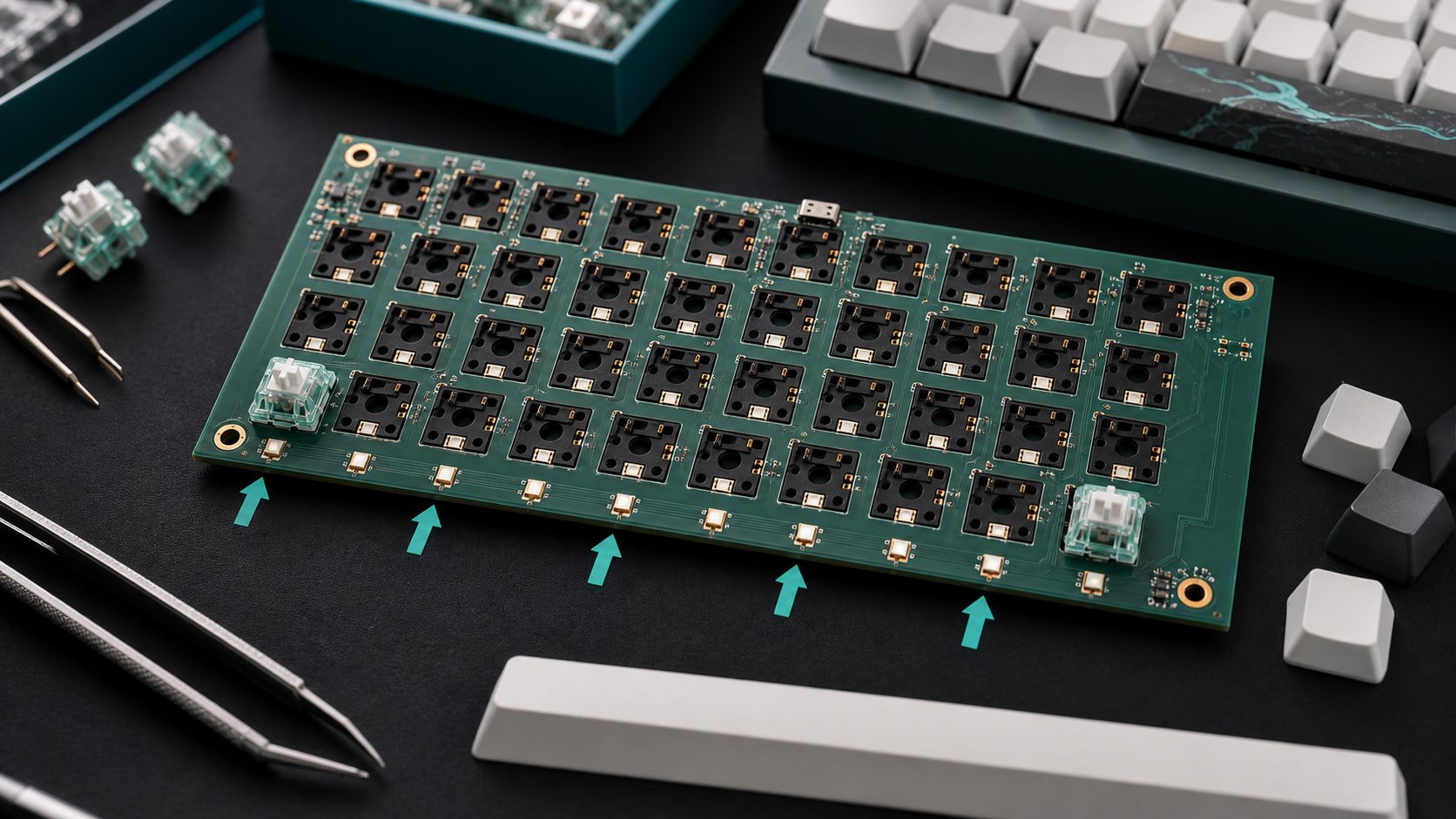
A south-facing PCB is a mechanical keyboard printed circuit board where each switch is oriented so the LED window or switch opening faces the lower edge of the keyboard, toward the spacebar side. This layout is commonly chosen to improve Cherry profile keycap compatibility and reduce interference, but it can change how RGB light reaches shine-through legends.
What South-Facing PCB Means
South-facing PCB describes switch orientation on a mechanical keyboard PCB, not the geographic direction of the product. In keyboard layout language, north means the top row side, south means the spacebar side, west means the left side, and east means the right side.
For most MX-style mechanical keyboard discussions, the easiest visual reference is the switch LED window or top housing opening. If that feature points toward the user and spacebar side after the switch is installed, the board is usually described as south-facing. If it points toward the function-row side, it is usually described as north-facing.
Why South-Facing PCB Matters
South-facing PCB matters because switch orientation affects keycap clearance, typing feel, sound consistency, RGB appearance, and the final user promise of the keyboard. It is a small layout detail on the PCB, but it becomes very noticeable when users install Cherry profile keycaps or compare lighting brightness.
For keyboard brands, this choice should be made before PCB layout is finalized. Changing orientation later can affect hot-swap socket placement, LED routing, diode position, stabilizer clearance, plate cutouts, firmware mapping, and assembly inspection. A board can pass electrical testing and still disappoint users if the switch orientation does not match the keycap and lighting plan.
South-Facing PCB vs North-Facing PCB
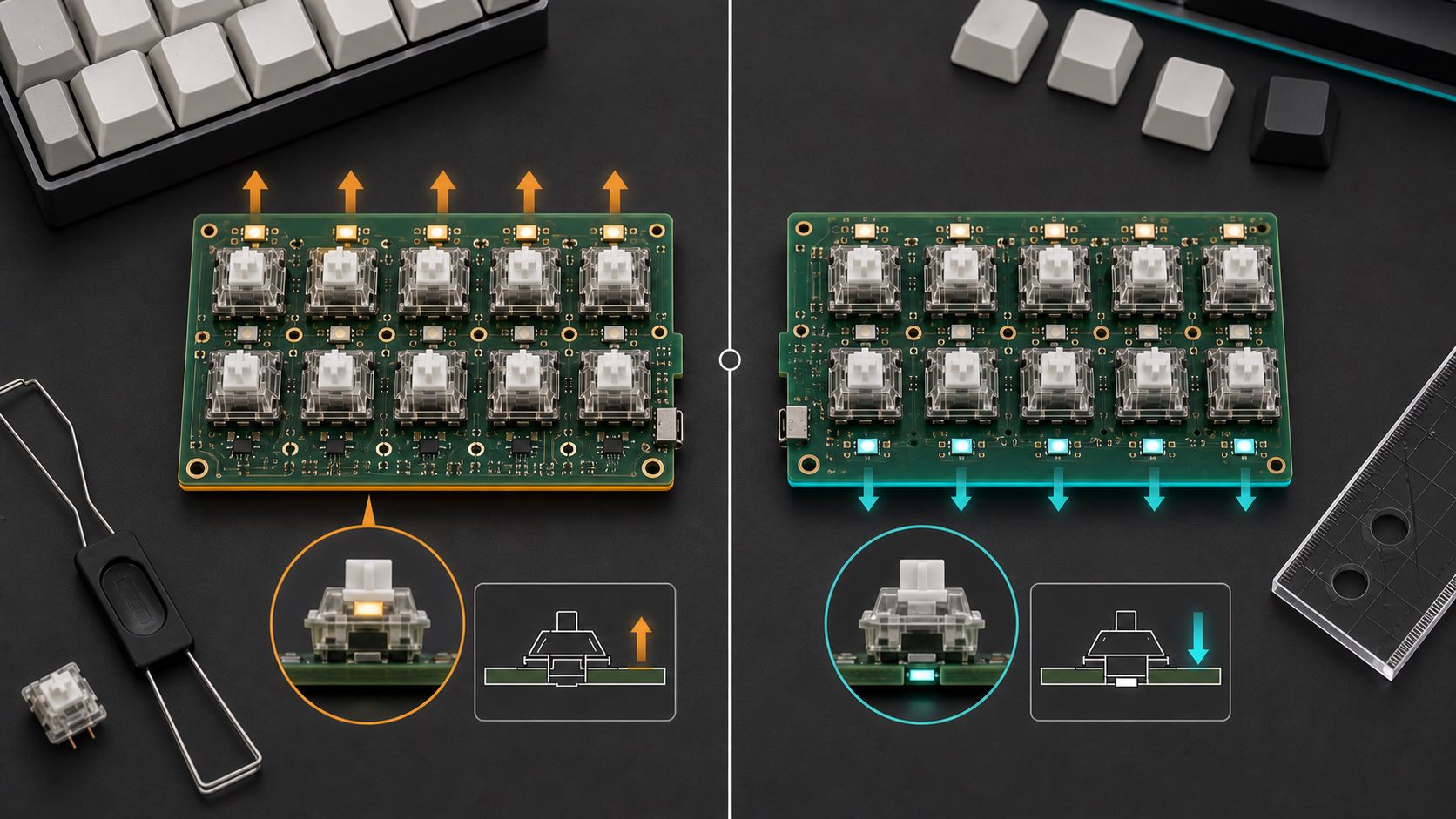
The main difference is that south-facing PCB usually favors keycap compatibility and typing feel, while north-facing PCB often favors brighter top shine-through legends. Neither orientation is automatically better; the right choice depends on the keycap profile, lighting goal, switch family, and target customer.
| Item | South-Facing PCB | North-Facing PCB | Buyer or Engineering Note |
| Switch orientation | LED window or switch opening faces the spacebar side | LED window or switch opening faces the top row side | Confirm orientation on the PCB layout drawing before sample build. |
| Cherry profile keycaps | Often preferred because it reduces a common interference risk | May interfere with some Cherry profile keycap and switch combinations | Always test with the exact switch and keycap set planned for production. |
| Top shine-through legends | May look dimmer if legends sit near the top of the keycap | Often brighter for top-positioned translucent legends | Match orientation to the visible lighting promise on the product page. |
| Typical audience | Custom keyboard users, enthusiast boards, office keyboards with solid keycaps | RGB gaming keyboards and boards using top shine-through keycaps | The market position should guide the PCB choice, not habit. |
| Manufacturing concern | Socket direction, LED position, and clearance validation | Legend brightness, interference checks, and switch compatibility | Both layouts need mechanical validation, not only electrical testing. |
How a South-Facing PCB Works
A south-facing PCB works by rotating the switch footprint so the switch housing feature and LED window face the lower side of the key. This changes the physical relationship between the switch top housing, the keycap interior, and the direction of any LED light.
In a hot-swap keyboard PCB, the socket direction must match the selected switch footprint and the approved orientation. In a soldered keyboard PCB, the through-hole pads and optional LED pads still need the same orientation control. For both designs, the switch plate and case stack must be reviewed with the PCB so the switch sits straight and the keycap travels freely.
Cherry Profile Keycap Compatibility
Cherry profile compatibility is the main reason many buyers ask for a south-facing PCB. Cherry profile keycaps are relatively low, and in some north-facing switch combinations the keycap can touch the switch top housing before the normal bottom-out point.
This contact is usually called keycap interference. It can make a key feel harsh, sound uneven, or stop slightly before the expected travel. South-facing orientation helps move the possible contact area away from the problematic side for many MX-style switch and Cherry profile combinations. It is still wise to test the real parts, because keycap wall thickness, switch housing shape, plate height, and mounting structure can all affect the result.
RGB Lighting Trade-Offs
The biggest trade-off is that south-facing PCB may reduce the brightness of top shine-through legends. Many translucent legends are placed near the upper part of a keycap, so north-facing LEDs often align more directly with that legend area.
South-facing does not mean poor RGB. It can work well for under-switch glow, side glow, diffuser effects, translucent switch housings, frosted plates, non-shine-through keycaps, and keyboards where the lighting is decorative rather than legend-critical. If the product is advertised as a bright top-legend RGB keyboard, however, the engineering team should validate the lighting effect early instead of discovering the mismatch after mass production.
Design Checks for a South-Facing Keyboard PCB
A south-facing keyboard PCB should be designed from the mechanical stack outward, not by rotating switch footprints at the last minute. The PCB, switch, socket, plate, stabilizer, LED, case, foam, and firmware all need to match the same orientation decision.
- Confirm whether the keyboard uses MX-style soldered switches or hot-swap sockets.
- Check 3-pin or 5-pin switch support and the required plate cutout.
- Verify hot-swap socket clearance against the case, foam, battery, and daughterboard.
- Review per-key LED position, polarity, diffuser path, and firmware mapping.
- Check stabilizer holes for spacebar, Enter, Shift, Backspace, and ISO layout options.
- Test the target keycap profile on every row, especially if Cherry profile support is a selling point.
- Confirm large-key feel and sound with the approved plate and mounting structure.
Manufacturing and Assembly Quality Control
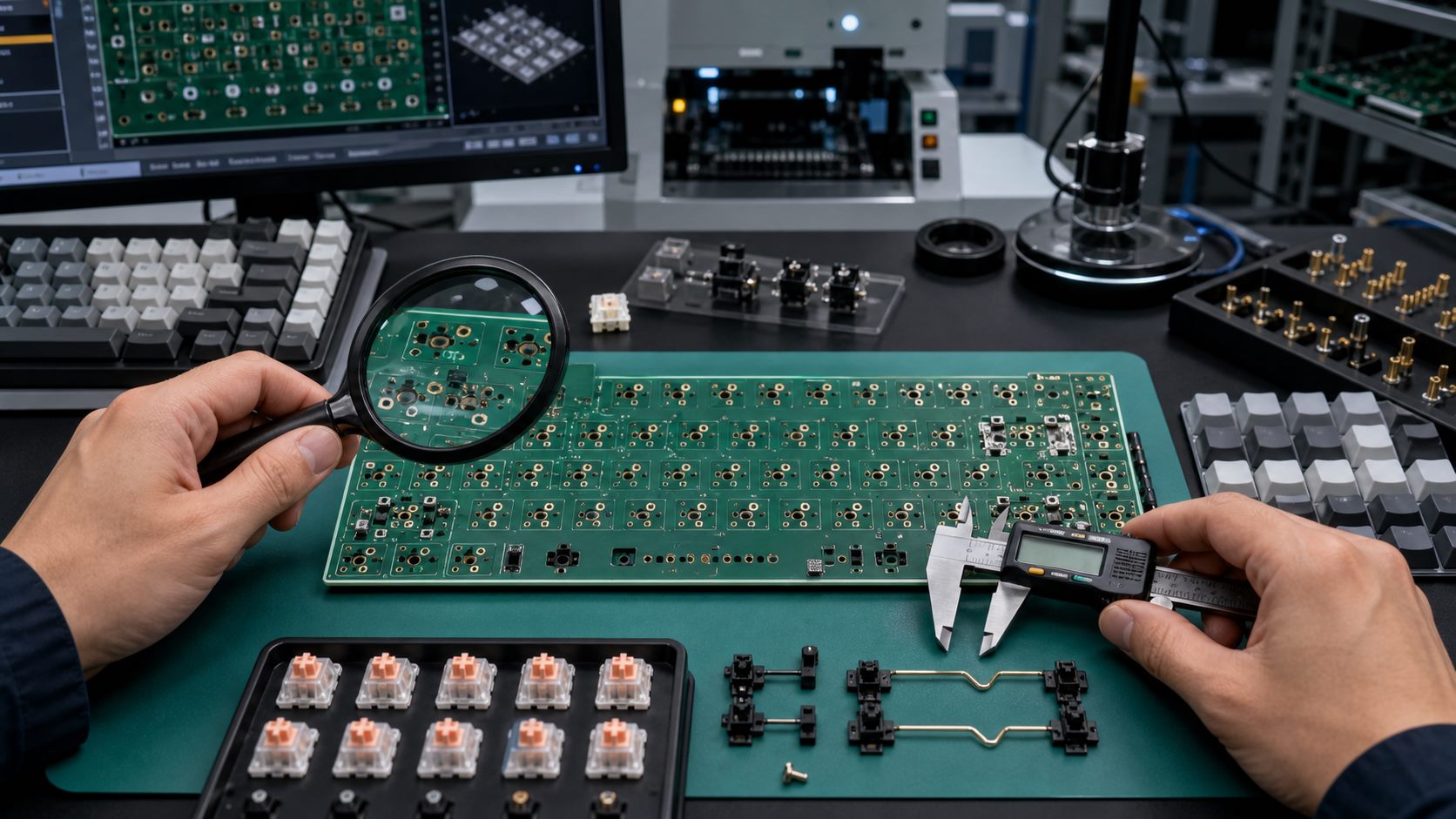
Quality control for a south-facing PCB should verify electrical function and mechanical fit. A keyboard PCB can pass continuity, diode, and RGB tests while still having user-facing problems in switch feel, socket strength, large-key travel, or lighting appearance.
| Check Item | What to Verify | Why It Matters |
| Switch orientation | Every footprint follows the approved south-facing layout | A single wrong footprint can create assembly or user complaints. |
| Hot-swap socket quality | Socket alignment, solder wetting, pad strength, and insertion reliability | Weak or tilted sockets can cause intermittent keys or poor switch fit. |
| Keycap clearance | Target keycap profile tested across rows and large keys | Prevents interference, harsh bottom-out, and inconsistent sound. |
| RGB and LED mapping | LED polarity, brightness, diffuser path, and firmware behavior | Lighting complaints are common when orientation and legend position conflict. |
| Stabilizer fit | PCB-mount or plate-mount stabilizer holes and wire clearance | Large keys often reveal tolerance problems first. |
Common Problems and Failure Modes
Most south-facing PCB failures come from treating orientation as a cosmetic preference instead of a product requirement. The design must be checked as a full keyboard system, not only as a circuit board.
- One or more switch footprints are accidentally mirrored during layout revision.
- Hot-swap sockets interfere with case foam, a battery, or the lower housing.
- Top shine-through legends look dimmer than expected on the final keycap set.
- Stabilizer mounting style does not match the plate and PCB plan.
- LED polarity or matrix mapping changes after a layout revision.
- Prototype testing uses substitute switches or keycaps instead of the real production combination.
- Marketing promises Cherry profile compatibility without physical clearance testing.
When OEM Keyboard Brands Should Choose South-Facing PCB
OEM keyboard brands should choose south-facing PCB when typing feel, Cherry profile compatibility, and custom keycap support matter more than maximum top-legend brightness. This is common for enthusiast keyboards, barebones kits, premium office boards, and custom mechanical keyboard projects.
| Product Goal | Recommended Direction | Reason |
| Enthusiast barebones keyboard kit | South-facing | Users often install Cherry profile or non-shine-through keycaps. |
| RGB gaming keyboard with top shine-through legends | North-facing or carefully validated south-facing | Legend brightness may be a stronger selling point than keycap flexibility. |
| Office keyboard with solid keycaps | South-facing | Typing feel and compatibility may matter more than direct legend lighting. |
| Low-cost mass-market keyboard | Depends on BOM and product promise | The lowest-risk choice is the one matched to the selected keycap, LED, and switch. |
Procurement Checklist for Custom South-Facing PCB Projects
Buyers should give the PCB/PCBA supplier a complete keyboard design package before asking for a south-facing PCB quotation. Orientation is tied to the physical product, so a schematic alone is not enough.
- Keyboard layout, matrix, and supported layout options.
- Approved south-facing switch orientation for every key position.
- MX-style switch family, 3-pin or 5-pin requirement, and soldered or hot-swap design.
- Hot-swap socket brand, equivalent requirement, or approved alternate list.
- Target keycap profile, especially Cherry profile if compatibility is required.
- LED plan: no LED, single-color backlight, per-key RGB, underglow, side glow, or diffuser-based lighting.
- Plate file, case file, foam stack, battery position, and daughterboard connection details.
- Firmware platform requirements, such as QMK or VIA compatibility, when applicable.
- Sample test plan for switch insertion, key feel, RGB mapping, stabilizer fit, and electrical function.
Supplier Questions Before Mass Production
A qualified keyboard PCB supplier should discuss south-facing orientation as a mechanical, electrical, and assembly issue. If the supplier only confirms the circuit and does not review switch and keycap fit, the project may still carry user-experience risk.
- Can you review switch orientation against the approved keyboard layout before tooling or sample build?
- Can you make prototypes with the exact hot-swap socket and switch family we plan to use?
- Can you test Cherry profile keycap clearance on every row?
- Can you verify LED polarity, brightness, diffuser path, and firmware mapping?
- Can you provide inspection photos for socket direction, soldering quality, and stabilizer areas?
- Can you support prototype, pilot build, and mass production with controlled revision records?
FAQ
What is a south-facing PCB?
A south-facing PCB is a mechanical keyboard PCB where the switch LED window or switch orientation faces the bottom edge of the keyboard, toward the spacebar side. It is mainly discussed in relation to switch orientation, keycap clearance, and RGB lighting.
Is south-facing PCB better than north-facing PCB?
South-facing is often better for Cherry profile keycap compatibility and typing feel, while north-facing can be better for bright top shine-through legends. The better choice depends on the keyboard’s keycap, switch, lighting, and target user.
Why do Cherry profile keycaps matter?
Cherry profile keycaps are relatively low. On some north-facing switch layouts, the inside of the keycap can contact the switch top housing before normal bottom-out. South-facing orientation reduces this common interference risk for many combinations.
Does south-facing PCB affect RGB lighting?
Yes. South-facing orientation can make top shine-through legends less bright if the LED does not align with the translucent legend area. It can still work well for underglow, side glow, diffuser effects, and non-shine-through keycaps.
Can a hot-swap keyboard PCB be south-facing?
Yes. A hot-swap keyboard PCB can use south-facing switch orientation. The layout must place sockets, switch pads, LEDs, stabilizer holes, and clearance zones correctly for the selected switch and case design.
Does south-facing PCB change keyboard sound?
It can indirectly affect sound when it prevents keycap interference or changes the way the keycap travels over the switch. Sound also depends on switch type, plate material, case structure, foam, stabilizers, and keycap material.
Do all custom keyboards use south-facing PCB?
No. Many enthusiast keyboards use south-facing PCB, but not all custom keyboards do. Some products choose north-facing orientation for stronger shine-through RGB or because their selected keycap and switch combination works well that way.
How can I tell if my keyboard PCB is south-facing?
Remove a keycap and look at the switch opening or LED window direction. If that side faces the lower edge of the keyboard, toward the spacebar side, the layout is generally called south-facing.
Is south-facing PCB more expensive?
The orientation itself is not necessarily more expensive. Cost is more affected by PCB layer count, hot-swap sockets, per-key RGB, assembly complexity, testing requirements, order quantity, and the amount of prototype validation needed.
Can south-facing PCB support per-key RGB?
Yes. South-facing PCB can support per-key RGB if the LED position, switch housing, diffuser path, and firmware are designed correctly. The key question is whether the final lighting effect matches the product promise.
What keycaps work best with south-facing PCB?
South-facing PCB is commonly preferred for Cherry profile and many non-shine-through keycap sets. Other profiles may also work well, but buyers should test the exact switch, keycap, plate, and case combination before production.
Should an OEM keyboard project choose south-facing PCB?
Choose south-facing PCB if your target users care about Cherry profile compatibility, custom keycap support, and typing feel. Be more careful if the main selling point is bright top shine-through RGB, because north-facing may align better with that visual goal.
Final Takeaway
A south-facing PCB is a practical keyboard layout decision that affects switch orientation, keycap clearance, RGB appearance, assembly checks, and user satisfaction. For OEM and custom keyboard projects, the safest choice is the orientation that matches the real switch, keycap, LED, plate, and case design.
If you’re sourcing reliable PCB/PCBA manufacturing, including OEM, ODM, prototyping, mass production, or custom engineering solutions, reach out to our engineering team for technical support and a quote at [email protected].



0 Comments