




One inch equals 25.4 millimeters exactly. To convert inches to millimeters, multiply the inch value by 25.4. To convert millimeters back to inches, divide the millimeter value by 25.4.
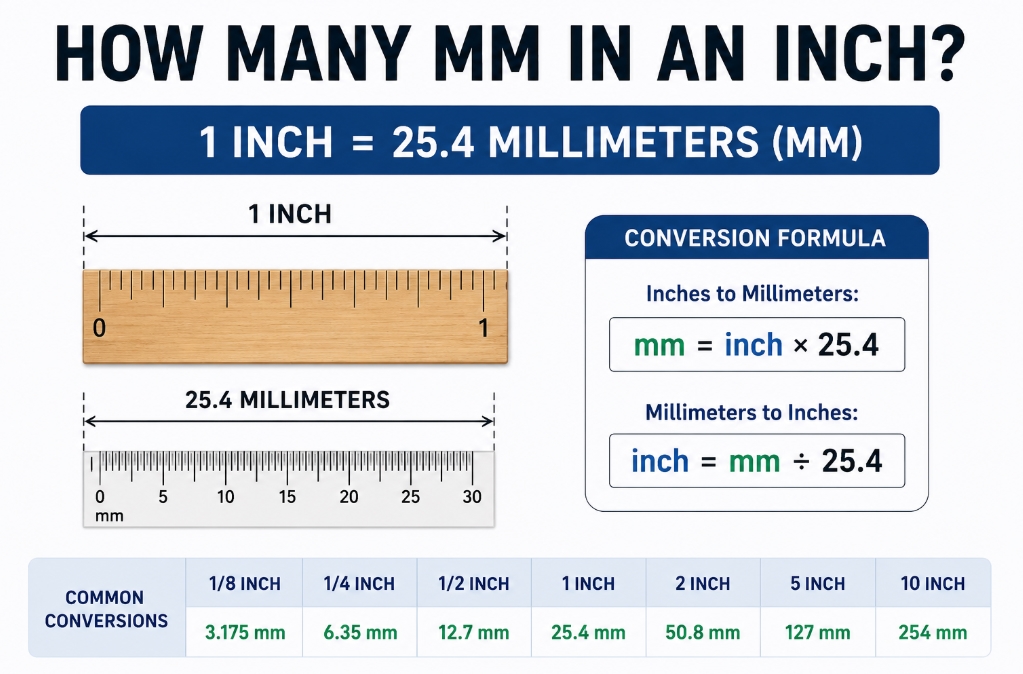
This exact relationship is used in engineering drawings, PCB layouts, mechanical parts, CNC machining, fasteners, tooling, packaging, and cross-border manufacturing projects. The standard inch has been defined as exactly equivalent to 25.4 mm since 1959.
What Does “How Many mm in an Inch” Mean?
“How many mm in an inch” asks for the exact metric equivalent of one inch.
The direct answer is:
1 inch = 25.4 mm
An inch is commonly used in the United States for dimensions such as screen size, pipe size, fasteners, sheet material, enclosures, and product drawings. A millimeter is part of the metric system and is widely used in engineering, manufacturing, electronics, PCB design, machining, and international sourcing.
For practical work, this conversion matters because many projects use mixed units. A U.S. buyer may provide an inch-based drawing, while a China factory, PCB manufacturer, CNC supplier, or assembly plant may quote and produce parts in millimeters.
Why Is 1 Inch Equal to 25.4 mm?
One inch equals 25.4 mm because the modern inch is defined by metric length.
In 1958, English-speaking countries agreed to unify yard and inch definitions. The updated conversion factor was announced in 1959, and the standard inch was defined as exactly 25.4 mm.
This means 25.4 mm is not an approximate value for normal engineering use; it is the exact conversion factor. This is important in manufacturing because small unit errors can become costly.
A hole diameter, board width, enclosure slot, connector pitch, or mounting distance can fail if the conversion is rounded incorrectly or entered with the wrong unit.
How Do You Convert Inches to Millimeters?
To convert inches to millimeters, multiply the inch value by 25.4.
Formula:
mm = inch × 25.4
| Decimal Inches | Fractional Inches | Metric | Metric | Decimal Inches |
|---|---|---|---|---|
| Dimensions — | Inches to Metric | Dimensions — | Metric to Inches | |
| 0.031” | 1/32” | 0.79 mm | 1.0 mm | 0.039” |
| 0.062” | 1/16” | 1.57 mm | 1.8 mm | 0.071” |
| 0.125” | 1/8” | 3.18 mm | 2.0 mm | 0.079” |
| 0.188” | 3/16” | 4.78 mm | 3.0 mm | 0.118” |
| 0.250” | 1/4” | 6.35 mm | 3.2 mm | 0.126” |
| 0.313” | 5/16” | 7.95 mm | 4.0 mm | 0.157” |
| 0.375” | 3/8” | 9.53 mm | 4.3 mm | 0.169” |
| 0.438” | 7/16” | 11.13 mm | 4.6 mm | 0.181” |
| 0.500” | 1/2” | 12.70 mm | 5.0 mm | 0.197” |
| 0.563” | 9/16” | 14.30 mm | 6.0 mm | 0.236” |
| 0.625” | 5/8” | 15.88 mm | 7.0 mm | 0.276” |
| 0.688” | 11/16” | 17.48 mm | 8.0 mm | 0.315” |
| 0.750” | 3/4” | 19.05 mm | 9.0 mm | 0.354” |
| 0.813” | 13/16” | 20.65 mm | 1.0 cm | 0.394” |
| 0.875” | 7/8” | 22.23 mm | 2.0 cm | 0.787” |
| 0.938” | 15/16” | 23.83 mm | 3.0 cm | 1.181” |
| 1” | 1” | 2.54 cm | 4.0 cm | 1.575” |
| 2” | 2” | 5.08 cm | 5.0 cm | 1.969” |
| 3” | 3” | 7.62 cm | 6.0 cm | 2.362” |
| 4” | 4” | 10.16 cm | 7.0 cm | 2.756” |
| 5” | 5” | 12.70 cm | 8.0 cm | 3.150” |
| 6” | 6” | 15.24 cm | 9.0 cm | 3.543” |
| 7” | 7” | 17.78 cm | 10.0 cm | 3.937” |
| 10” | 10” | 25.40 cm |
How Do You Convert Millimeters to Inches?
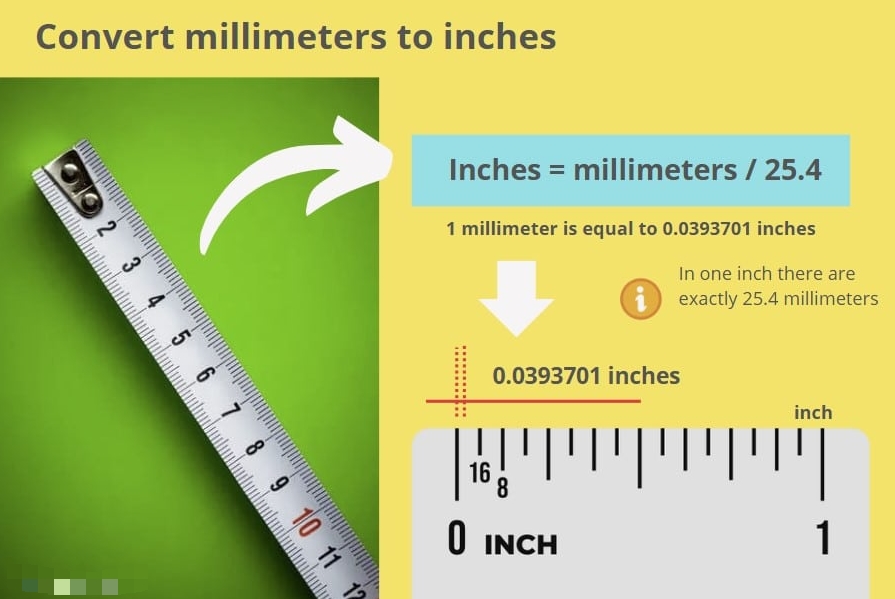
To convert millimeters to inches, divide the millimeter value by 25.4.
Formula:
inch = mm ÷ 25.4
| Millimeter Value | Calculation | Inch Result |
|---|---|---|
| 1 mm | 1 ÷ 25.4 | 0.03937 in |
| 10 mm | 10 ÷ 25.4 | 0.3937 in |
| 25.4 mm | 25.4 ÷ 25.4 | 1 in |
| 50.8 mm | 50.8 ÷ 25.4 | 2 in |
| 100 mm | 100 ÷ 25.4 | 3.937 in |
For quick checking, remember this:
1 mm = 0.03937 inch
What Is the Quick Inch to mm Conversion Chart?
A quick inch to mm chart helps users avoid repeated calculator checks.
| Inches | Millimeters |
|---|---|
| 1/64 in | 0.3969 mm |
| 1/32 in | 0.7938 mm |
| 1/16 in | 1.5875 mm |
| 1/8 in | 3.175 mm |
| 1/4 in | 6.35 mm |
| 3/8 in | 9.525 mm |
| 1/2 in | 12.7 mm |
| 5/8 in | 15.875 mm |
| 3/4 in | 19.05 mm |
| 7/8 in | 22.225 mm |
| 1 in | 25.4 mm |
| 2 in | 50.8 mm |
| 3 in | 76.2 mm |
| 4 in | 101.6 mm |
| 5 in | 127 mm |
| 10 in | 254 mm |
Fractional inch charts are especially useful for machining, plumbing, construction, hardware selection, sheet metal, and mechanical drawings.
How Do Fractional Inches Convert to mm?
Fractional inches convert to millimeters by first converting the fraction into a decimal inch, then multiplying by 25.4.
Example:
1/4 inch = 0.25 inch
0.25 × 25.4 = 6.35 mm
| Fractional Inch | Decimal Inch | Millimeters |
|---|---|---|
| 1/16 in | 0.0625 in | 1.5875 mm |
| 1/8 in | 0.125 in | 3.175 mm |
| 3/16 in | 0.1875 in | 4.7625 mm |
| 1/4 in | 0.25 in | 6.35 mm |
| 5/16 in | 0.3125 in | 7.9375 mm |
| 3/8 in | 0.375 in | 9.525 mm |
| 1/2 in | 0.5 in | 12.7 mm |
| 3/4 in | 0.75 in | 19.05 mm |
| 1 in | 1.0 in | 25.4 mm |
Why Does Inch to mm Conversion Matter in Engineering?
Inch to mm conversion matters because design, procurement, manufacturing, and inspection teams often work across different unit systems.
A drawing from a U.S. engineer may use inches, while a supplier in China, Europe, or Southeast Asia may manufacture in millimeters. If the unit conversion is not controlled, the final part may have wrong hole spacing, incorrect board size, mismatched connector clearance, poor enclosure fit, or failed assembly alignment.
In PCB and PCBA projects, inch-to-mm conversion appears in board outline, mounting holes, connector pitch, component keep-out zones, panel size, stencil opening, and mechanical enclosure matching.
A small conversion error can cause a board to fit poorly inside the enclosure or create soldering and assembly problems.
Where Is Inch to mm Conversion Used?
Inch to mm conversion is used wherever U.S. customary dimensions meet metric manufacturing.
| Application Area | Typical Conversion Need | Risk If Converted Wrong |
|---|---|---|
| PCB design | Board size, hole spacing, connector position | Poor enclosure fit or assembly failure |
| CNC machining | Part length, hole diameter, slot width | Wrong tolerance or rejected part |
| Sheet metal | Thickness, bend location, cutout size | Misfit during assembly |
| Fasteners | Screw size, washer diameter, clearance hole | Loose or blocked mounting |
| Tooling | Mold inserts, fixture plates, jig location | Production repeatability issues |
| Packaging | Box size, foam insert, label space | Shipping damage or poor product fit |
| Electronics assembly | Stencil thickness, panel dimension, fixture design | Solder defects or handling issues |
The conversion itself is simple, but the project risk is not. The key is to confirm whether each dimension is intended as a nominal value, a tolerance-controlled value, or a reference-only value.
What Are the Common Mistakes When Converting Inches to mm?
The most common mistake is treating 25.4 mm as an approximate number when the project needs controlled dimensions.
| Mistake | Example | Practical Result |
|---|---|---|
| Rounding too early | 1/16 in rounded to 1.6 mm | Small but repeated stack-up error |
| Mixing inch and mm in one drawing | Hole in mm, outline in inch | CAM or machining confusion |
| Confusing mil and mm | 10 mil read as 10 mm | Major PCB or film thickness error |
| Ignoring tolerance | 25.4 mm used without ± tolerance | Inspection dispute |
| Using screen size logic for mechanical parts | “2 inch” treated casually | Poor fit in real assembly |
| Copying calculator values blindly | Too many decimals added | Over-specified drawing |
For manufacturing, the safest practice is to convert dimensions once, define the official working unit, and keep tolerance notes clear.
How Accurate Should Inch to mm Conversion Be?
For general reference, 1 inch = 25.4 mm is enough. For engineering production, the required decimal places depend on the tolerance and process capability.
| Use Case | Recommended Format | Notes |
|---|---|---|
| General explanation | 1 in = 25.4 mm | Suitable for learning and quick reference |
| Product size | 25.4 mm or 25.40 mm | Depends on drawing precision |
| Machining | 25.400 mm if needed | Match tolerance requirement |
| PCB layout | Usually mm with CAD precision | Confirm drill, outline, and panel data |
| Inspection report | Follow drawing decimal places | Do not add false precision |
More decimal places do not automatically mean better quality. The drawing tolerance, material behavior, machine capability, and inspection method decide the real accuracy.
How Should Engineers Use Inch to mm Conversion in Drawings?
Engineers should define one master unit system in the drawing and avoid uncontrolled mixed-unit dimensions.
| Drawing Item | Recommended Practice |
|---|---|
| Unit note | State whether the drawing is in mm or inches |
| Converted values | Keep enough decimal places for tolerance |
| Tolerance block | Define general tolerance clearly |
| Critical dimensions | Mark as inspection-controlled |
| Reference dimensions | Label as REF if not for manufacturing control |
| PCB files | Keep Gerber, drill, pick-and-place, and mechanical drawings consistent |
| Supplier communication | Confirm whether quote and inspection will use mm or inches |
For PCB and PCBA production, the supplier should check board outline, drill file, copper-to-edge clearance, mounting holes, component height, and enclosure constraints before fabrication or assembly.
How Does Inch to mm Conversion Affect PCB and PCBA Projects?
In PCB and PCBA projects, inch-to-mm conversion affects both electrical and mechanical fit.
| PCB/PCBA Item | Inch-Based Input | Metric Manufacturing Impact |
|---|---|---|
| Board outline | 2 in × 3 in | 50.8 mm × 76.2 mm board |
| Mounting holes | 0.125 in hole | 3.175 mm hole |
| Connector pitch | 0.1 in | 2.54 mm pitch |
| Stencil thickness | 4 mil | 0.1016 mm |
| Clearance | 0.02 in | 0.508 mm |
| Panel rail | 0.4 in | 10.16 mm |
A common PCB mistake is confusing mil with mm. In PCB work, 1 mil = 0.001 inch, not 1 millimeter. That means 10 mil = 0.254 mm, not 10 mm.
This mistake can cause incorrect trace width, spacing, stencil thickness, or mechanical clearance.
What Is a Practical Manufacturing Case for Inch to mm Conversion?
A U.S. electronics customer may send a PCB outline in inches while the enclosure supplier and PCB factory work in millimeters.
| Item | Original Value | Converted Value |
|---|---|---|
| PCB length | 4.00 in | 101.60 mm |
| PCB width | 2.50 in | 63.50 mm |
| Mounting hole diameter | 0.125 in | 3.175 mm |
| Connector edge clearance | 0.20 in | 5.08 mm |
| Stencil thickness | 5 mil | 0.127 mm |
The engineering risk is not the formula. The real risk is uncontrolled rounding. If the hole diameter is rounded from 3.175 mm to 3.2 mm, that may be acceptable in one project but not in another.
If the board outline is rounded without checking the enclosure, the PCB may shift, interfere with plastic ribs, or fail final assembly. A reliable supplier should review unit consistency before production, not after parts are made.
How Do You Choose the Right Conversion Method for Procurement?
For procurement, the best conversion method depends on whether the dimension is used for quotation, manufacturing, or inspection.
| Procurement Need | Best Practice |
|---|---|
| Rough size estimate | Use 1 in = 25.4 mm |
| Quote comparison | Send both original and converted values |
| Manufacturing drawing | Use one official unit system |
| Quality inspection | Follow drawing tolerance and decimal places |
| Supplier sourcing | Confirm whether the supplier works in inch, mm, or both |
| Cross-border orders | Attach CAD files, drawings, BOM, and unit notes |
For OEM and ODM projects, buyers should not rely only on screenshots, handwritten dimensions, or online calculator outputs. Send editable CAD files, Gerber files, mechanical drawings, and inspection requirements whenever possible.
What Should You Check Before Sending Files to a Supplier?
Before sending files to a supplier, check whether all dimensions, tolerances, and production files use the same unit logic.
| Check Item | Why It Matters |
|---|---|
| Master unit | Prevents inch/mm confusion |
| Board or part outline | Controls mechanical fit |
| Hole size and position | Affects mounting and alignment |
| Tolerance notes | Prevents inspection disputes |
| CAD export settings | Avoids scaling errors |
| Drawing revision | Keeps supplier and buyer aligned |
| Critical dimensions | Shows what must be inspected |
| Material thickness | Prevents fit, weight, or strength errors |
| Packaging size | Avoids shipping and storage issues |
| Supplier confirmation | Reduces avoidable production mistakes |
For PCB/PCBA projects, also confirm Gerber units, drill units, pick-and-place units, stencil thickness, panel drawing, and enclosure matching dimensions.
FAQs About How Many mm in an Inch
How many mm are in an inch?
There are 25.4 mm in one inch. This is the exact standard conversion, not a rough estimate for normal engineering use. To convert inches to millimeters, multiply the inch value by 25.4. For example, 2 inches = 50.8 mm, and 10 inches = 254 mm.
Is 1 inch exactly 25.4 mm?
Yes. One inch is exactly 25.4 mm under the modern international definition of the inch. This is why engineers, manufacturers, and inspectors use 25.4 as the official conversion factor in technical drawings, production files, inspection reports, and sourcing communication.
How do I convert inches to mm quickly?
Multiply the inch value by 25.4. The formula is mm = inch × 25.4. For example, 5 inches × 25.4 = 127 mm. If you only need a rough mental estimate, 1 inch is about 25 mm, but production drawings should use 25.4 mm.
How do I convert mm to inches?
Divide the millimeter value by 25.4. The formula is inch = mm ÷ 25.4. For example, 50.8 mm ÷ 25.4 = 2 inches. This reverse conversion is useful when a metric drawing must be reviewed by a U.S. buyer or inch-based design team.
What is 1/2 inch in mm?
1/2 inch = 12.7 mm. The calculation is 0.5 × 25.4 = 12.7 mm. This size appears often in hardware, tubing, sheet material, mechanical spacing, and product dimensions. For manufacturing, confirm whether 12.7 mm is nominal or tolerance-controlled.
What is 1/4 inch in mm?
1/4 inch = 6.35 mm. First convert the fraction to decimal: 1/4 = 0.25. Then multiply by 25.4. The result is 6.35 mm. This conversion is common in fasteners, holes, tooling, fixtures, and mechanical layouts.
What is 1/8 inch in mm?
1/8 inch = 3.175 mm. The calculation is 0.125 × 25.4 = 3.175 mm. In production, this value may be rounded depending on tolerance, drilling method, or material. Do not round it automatically without checking the drawing requirement.
What is 1 mm in inches?
1 mm = 0.03937 inch. The reverse calculation is 1 ÷ 25.4 = 0.03937. This value is useful when reviewing metric drawings, CNC dimensions, PCB mechanical data, enclosure drawings, or component dimensions in inch-based systems.
Why do some charts show rounded inch-to-mm values?
Some charts round values to make them easier to read. For example, 1/16 inch may be shown as 1.59 mm instead of 1.5875 mm. Rounded values are useful for quick reference, but production drawings should follow the required tolerance and inspection standard.
Is mil the same as mm?
No. Mil and mm are different units. In engineering and PCB work, 1 mil = 0.001 inch = 0.0254 mm. A millimeter is much larger than a mil. Confusing mil and mm can cause serious PCB layout, stencil, spacing, or thickness errors.
Why do U.S. drawings use inches while factories use mm?
Many U.S. drawings use inches because the U.S. customary system is still common in mechanical design, construction, hardware, and product development. Many global factories use millimeters because metric units are standard in manufacturing. Clear conversion avoids scaling mistakes and supplier disputes.
Should I send suppliers inch or mm drawings?
Send the original drawing and clearly state the official production unit. If your drawing was designed in inches, do not let suppliers guess converted values. For PCB, PCBA, CNC, sheet metal, tooling, and assembly projects, include CAD files, tolerance notes, and revision control.
Can inch-to-mm conversion affect product quality?
Yes. The formula is simple, but rounding, unit mixing, and tolerance errors can affect product quality. Problems may include wrong hole position, poor enclosure fit, fixture mismatch, rejected inspection, or assembly interference. This is why engineering review is important before mass production.
What is the safest way to avoid inch/mm mistakes?
Use one master unit system, keep tolerance notes clear, and confirm all converted dimensions before production. For technical projects, ask the supplier to review drawings, CAD files, BOM, Gerber files, drill files, enclosure drawings, and inspection criteria before manufacturing starts.
Conclusion
1 inch equals 25.4 mm exactly, and this simple conversion affects far more than classroom math. In engineering, PCB design, CNC machining, tooling, fixtures, enclosures, packaging, and global sourcing, correct inch-to-mm conversion protects fit, tolerance, inspection, and final assembly quality.
For simple reference, use mm = inch × 25.4. For production, also check decimal places, tolerance notes, CAD units, drawing revisions, and supplier interpretation. The best choice is to confirm all inch and millimeter dimensions before tooling, fabrication, assembly, or batch production.



0 Comments